


Dollarwise: Budget & Tracking
3.31.16K Reviews
App Specs
- Version
- 6.4.0
- Updated On
- License
- Free
- Downloads
- 100,000+
- Developer
- HammerMedia
- Categories
- Finance
- Platform
- Android
Screenshots
 Analysis by AppCompare
My first test of Dollarwise: Budget & Tracking left me with a practical question: does a straightforward budget tool make it easier to change everyday habits, or does it become one more app to maintain? That matters more to me than a polished dashboard. Dollarwise is a free finance app from HammerMedia, but it also offers in-app purchases, so I’d treat the initial download and any paid extras as separate value questions rather than assuming every tool is included.
There is a useful amount of context for deciding whether to try it: Dollarwise was released on January 9, 2025, and its current version is 6.0.0. It has passed 100,000 installs, while its 1.9 average from around 1,700 ratings is a reason to approach it cautiously. That score does not tell me exactly what any one person experienced, but it does make it sensible to check whether the current version suits your needs before relying on it as your only way to track money.
What the free starting point is worth
The app is listed as free, with in-app purchases ranging from $14.99 to $499.99 per item. That spread is wide enough that I would not assume a purchase is necessary, or that every option represents good value for every user. I’d first explore the free experience and decide whether its budgeting workflow is genuinely useful in my routine; only then would I consider paying for something specific. The age rating is Everyone, but that describes its store classification, not whether a particular financial setup is right for a household.
For me, the main value of a budget app is not the number of charts it can show. It is whether I can enter a purchase quickly, recognize a pattern before the month ends, and adjust without turning money management into a second job. Dollarwise’s appeal is its plain approach: set money aside for categories, record spending, and use the resulting view to make a decision. If that basic loop is what you need, a free starting point can be worthwhile even before you think about paid items.
Where the routine can help—and where it can snag
A realistic use is a weekly check-in: I might review recent purchases, notice that takeout is using more of its allocation than expected, and choose a smaller limit for the remaining days. The important step is not the graph itself; it is acting on what it shows. For anyone paid on an irregular schedule, I’d be careful about setting category limits from an optimistic month. A conservative plan is easier to keep than one that assumes every week will go perfectly.
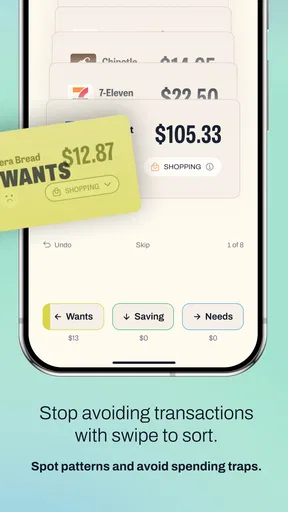
Manual entry can also be a useful trade-off. It makes me stop and label a purchase, which can build awareness, but it relies on remembering to do that consistently. A receipt photo may help when I have several expenses to log later, though it still doesn’t replace checking that the amount and category are correct. I’d treat a quick daily entry or a short weekly catch-up as part of the system, rather than expecting a budget to stay accurate by itself.
How I’d compare it with other money tools
Compared with a basic spreadsheet or notes app, Dollarwise gives budgeting a more guided structure, with categories, reports, and goals in one place. A spreadsheet may be more flexible for someone who wants custom formulas or a detailed household ledger, but it asks for more setup and upkeep. Compared with a bank’s own spending view, a dedicated budgeting app can make it easier to think in planned limits rather than simply look back at transactions. The better choice depends on whether you want a plan you actively maintain or an overview that mostly follows your account activity.
Worth Reading Before You Choose

EA SPORTS FC Mobile 26 Is a Bigger Football Game, but It Takes Time

Flipboard Shows What News Apps Must Do Beyond the Feed

Switching to Android Auto Means Rethinking Your Driving Routine

Google Calendar Makes a Crowded Week Easier to Manage

Ludo King Makes the Most of the Minutes Between Plans

Baby Panda World Brings Quick Play to Modern Phones, but Its Game Library Feels Busy
I would not choose it simply because it presents itself as a complete financial solution. Anyone who needs investment tracking, tax preparation, shared account management, or automatic transaction syncing should check that those specific needs are met before moving their routine into the app. A budget tracker is most useful when its actual workflow matches your money habits; a familiar bank tool or spreadsheet may be the safer fit if you need a feature Dollarwise does not provide for your situation.
Who is likely to get the most from it?
I can see Dollarwise being a reasonable trial for someone who wants to start budgeting without first learning a complicated system. It may suit a person with a few clear spending categories, a short-term savings target, and enough patience to enter purchases. It is less compelling for someone who wants budgeting to happen automatically, dislikes logging transactions, or needs a high degree of customization. If several people need to update the same plan, I would also check the available sharing workflow before depending on it.
Before committing, I’d try one small, ordinary week rather than building a detailed annual plan. Pick a handful of categories that actually influence your decisions, record purchases soon after they happen, and see whether the review changes what you do next. That gives a fairer test of usefulness than filling every category at once. It also limits the frustration of setting targets that look neat in an app but do not reflect real bills, timing, or family responsibilities.
First Impressions: Easy Peasy Setup
Let’s kick things off with the setup. Downloading and installing the app was a breeze. Once you fire it up, you’re greeted with a clean, intuitive interface that screams simplicity. No overwhelming charts or jargon—just straightforward instructions to get you started on your budgeting journey.
Signing up is as easy as pie. You can either create a new account or connect via your Google or Facebook account. I went the Google route, and in less than a minute, I was in. The app then asks a series of questions to tailor your experience. It’s like having a personal finance guru asking all the right questions to understand your financial landscape.
Features: What Makes Dollarwise Shine
Now, onto the good stuff—what can Dollarwise: Budget & Tracking actually do for you? The app is packed with features that cater to both budgeting newbies and seasoned veterans.
- Budget Creation: Set up your budget in a few taps. Whether you’re focusing on groceries, entertainment, or saving for that dream vacation, Dollarwise makes it super simple to allocate funds.
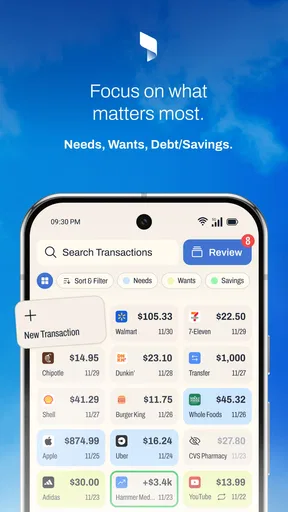
- Expense Tracking: Recording expenses is seamless. Just enter the amount, category, and voila! The app even lets you snap photos of receipts, so you don’t have to worry about losing them.
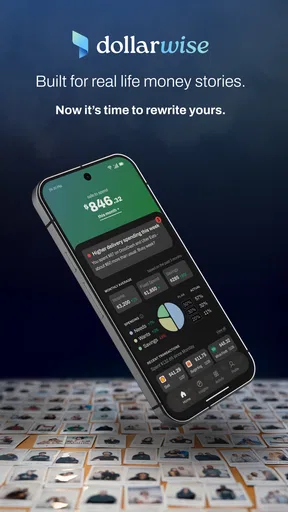
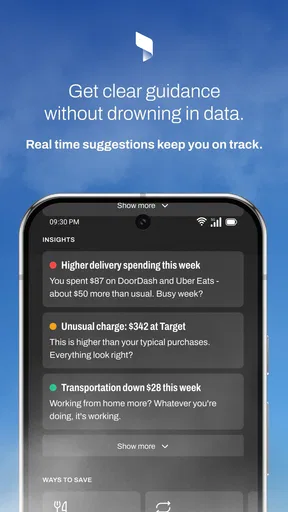
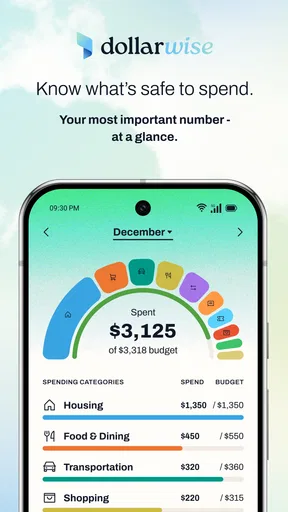
- Financial Insights: Want to know where your money is going? The app offers detailed reports and graphs to give you a clear picture of your spending habits. It’s like having a financial crystal ball.
- Goal Setting: Have a financial goal in mind? Set it up in the app, and watch as Dollarwise helps you track your progress. It’s incredibly motivating to see the percentage bar move as you get closer to your target.
User Experience: Smooth Sailing
One of the standout aspects is the user experience. The app runs smoothly on both Android and iOS, with no noticeable lags or crashes during my time with it. The design is sleek, with a pleasing color palette that makes navigating through different sections a joy.
Notifications are customizable, which means you can choose how often you want the app to nudge you about your spending. Personally, I found the gentle reminders quite helpful without being intrusive.
Security: Your Data’s Safe Here
In today’s digital age, security is paramount. Dollarwise doesn’t skimp on this aspect. The app uses encryption to keep your data safe and sound. Plus, with options for biometric login, you can rest easy knowing that only you can access your financial info.
Final Thoughts: Is Dollarwise Worth It?
So, should you give Dollarwise: Budget & Tracking a shot? If you’re looking for a user-friendly app that offers a comprehensive suite of budgeting tools, then absolutely. It’s perfect for anyone wanting to take control of their finances without getting bogged down by complexity.
While it doesn’t have every bell and whistle under the sun, its strength lies in its simplicity and effectiveness. It’s like having a friendly financial advisor at your fingertips, gently steering you towards smarter spending habits.
In a nutshell, if you’re eager to start saving more and spending wisely, Dollarwise might just be the app you need to make that happen. So, why not give it a whirl and see if it helps you become the budgeting pro you’ve always wanted to be?
A sensible way to test it before relying on it
One question I’d ask before making Dollarwise part of a long-term routine is whether its prompts feel helpful after the novelty wears off. A reminder can bring a forgotten purchase to mind, but too many alerts can become background noise. I’d start with only the notifications that support a real habit, such as a regular review, and change them if they begin to feel like nagging. The point is to make the budget easier to revisit, not to let alerts dictate every small spending choice.
I’d also keep the first goal modest and concrete. Instead of trying to overhaul every part of my finances, I could set aside money for a planned expense and check progress when I record spending. This makes the goal feature easier to judge: does seeing progress help me make a trade-off today, or is it just a satisfying bar on the screen? If it leads to a choice I can maintain, it is doing useful work; if not, I would simplify the plan rather than add more targets.
Questions worth settling for your own routine
Would I use this instead of a spreadsheet? If I wanted a guided category budget and an easier visual review, I’d give Dollarwise a try. If I relied on custom calculations, shared worksheets, or a detailed record of household finances, I’d stay with a spreadsheet unless the app clearly supported that workflow. The practical difference is not which tool looks more modern; it is which one I will keep accurate when life gets busy.
Would I need to enter everything by hand? The workflow described here includes entering the amount and category, and it offers receipt photos as another way to keep a record. That makes it a better fit for someone willing to participate in tracking than for someone who expects a budget to build itself. If I often forget purchases, I’d test my logging habit first, because incomplete entries can make a report look more reassuring or alarming than reality.
Can I rely on it for sensitive financial planning? I’d use a budgeting app to organize day-to-day choices, not as a substitute for professional advice or a complete financial record. The published version is 6.0.0, and the app has a low average rating, so I would take time to confirm that the features I need work well for me before making it central to decisions. I would also avoid treating an attractive report as a guarantee that every transaction or assumption is correct.
My buy-or-skip call
My recommendation is cautious rather than automatic. Dollarwise is worth a low-commitment try if your main goal is to build a simple budget, log spending, and keep an eye on a personal savings target. Its free entry point makes that test possible without paying first, while the in-app purchase range means I would inspect any paid option carefully and judge it against a specific need rather than buying out of curiosity.
I’d skip it if you need automatic tracking, advanced household coordination, or a tool you never have to maintain. I’d also look closely at the recent experience before trusting it with an important financial routine, especially given the 1.9 average rating from around 1,700 ratings. For someone who is ready to enter purchases and wants a clear structure, it may help turn vague intentions into a repeatable check-in. For everyone else, a bank’s spending view, a spreadsheet, or another tool built around their exact workflow may be the more dependable choice.
Pros
- User-friendly interface for easy navigation.
- Comprehensive expense tracking features.
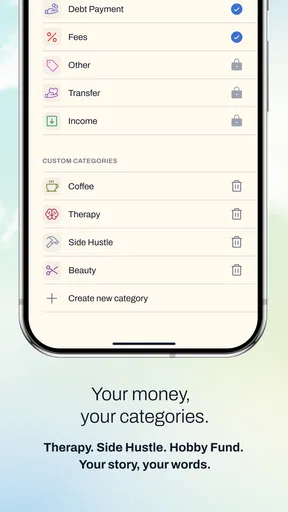
- Customizable budget categories.
- Real-time expenditure alerts.
- Cross-platform synchronization.
Cons
- Limited integration with banking apps.
- No multi-currency support.
- Ads in the free version can be intrusive.
- Requires internet for full functionality.
- Limited customization for reports.
FAQs for Dollarwise: Budget & Tracking
What features does Dollarwise: Budget & Tracking offer?
Dollarwise: Budget & Tracking provides a comprehensive suite of tools for managing your finances. It includes budget creation, expense tracking, and financial goal setting. The app also offers insightful reports and charts to help users visualize their spending habits. Additionally, it syncs across devices, ensuring your data is always up-to-date.
Is Dollarwise: Budget & Tracking safe to use with my financial information?
Yes, Dollarwise prioritizes user security by implementing advanced encryption protocols to protect your financial data. The app does not store any sensitive information on its servers, and it offers additional security features like biometric login options to ensure that your data remains private and secure.
Can Dollarwise connect with my bank accounts automatically?
Yes, Dollarwise supports secure bank account connections to automatically import transactions. This feature saves time by reducing the need for manual entry and ensures that your budget is always accurate. The app supports connections with most major banks, offering convenience and accuracy in tracking your finances.
Does Dollarwise: Budget & Tracking offer customer support?
Dollarwise provides excellent customer support through various channels including email, chat, and a comprehensive help center. Users can access detailed guides and FAQs on the app's website, and the support team is responsive and knowledgeable, ensuring any issues are resolved promptly.
Is Dollarwise: Budget & Tracking suitable for beginners?
Absolutely. Dollarwise is designed with user-friendliness in mind, featuring an intuitive interface and easy-to-navigate menus. Whether you're new to budgeting or an experienced user, the app provides step-by-step guidance to help you set up your budget and start tracking your expenses efficiently.


